
Think of the most rewarding parts of legal work. Helping a client through a tricky situation. Solving a complex problem. Winning a case.
Writing up meeting notes probably didn’t make the list. It’s an unsatisfying part of the job, but an important one.
Every client call, every instruction, every decision should be captured clearly and stored somewhere your firm can rely on. The trouble is doing that consistently without piling more admin onto your day.
That’s the job an AI notetaker does. It gives you a clean transcript, a tidy summary, and a few action items too.
For a law firm, though, that’s only half of it. The other half is what happens to the notes afterwards. That’s where your choice of AI notetaker starts to matter.
In this article, we’ll cover how to choose a notetaker that suits legal work, and how to actually use one to win back time in your day.
What is an AI notetaker?
Traditionally, taking meeting notes was someone in the room’s job. Often that fell to the junior or paralegal who could type the fastest. Now, for both video and in-person meetings, note-taking can happen in the background without anyone having to handwrite or type up a transcript themselves.
That’s what an artificial intelligence (AI) notetaker does. How it takes those notes varies by tool (more on that shortly). Used well, an AI notetaker changes the meeting itself. You stop scrambling to catch every word and actually listen, knowing the notetaker has the record covered.
But taking those notes and summarising them isn’t the full picture. For a law firm, the real value comes from having the note saved straight to the right matter in your legal software, the billable time from the meeting recorded, and the write-up time you’d usually lose to admin freed up for actual legal work.
The two types of AI notetakers
So what could your firm actually use today? There are two ways these tools can capture meetings:
- Bot-based notetakers dial into your video call as an attendee. The giveaway is a name in the participant list. You’ll see something like “Otter Notetaker” sitting in the meeting alongside you and your client.
- Bot-free notetakers pull audio straight from your computer, so no extra participant appears on the call. Tools like Granola, Jamie and VXT Meet all work this way.
Why the type of AI notetaker you choose matters
Either approach can produce a perfectly good set of notes. The difference starts to matter once you ask how a tool captures the meeting, what happens to those notes afterwards, and whether it fits the way your firm actually works.
Start with where your meetings happen. You don’t always get to choose the platform a client uses, so a tool that only works on certain video platforms leaves you stuck the moment someone sets up the call themselves and sends a link from somewhere else. And a lot of legal work doesn’t happen on a screen at all: intakes, will signings, the conversation across your desk. A bot can’t follow you into the room. The notetaker that works everywhere your meetings happen (across video and in person meetings) is usually the one that fits a firm best.
Then there’s the notetaker itself. If it’s a bot, it has to be admitted to the call, can be blocked by enterprise security, and adds another “participant” to a potentially confidential conversation (and there’s nothing worse than being in a meeting where the bots outnumber the people!).
And then there’s what happens after the meeting. A note and summary left sitting in a separate app just creates more handling. That’s the exact admin an AI notetaker was supposed to remove. The ones built for legal work save the note straight to the right matter in your legal software and log the billable time in the same moment.
Add all this up and it becomes clear that an AI notetaker that works quietly in the background on any platform, in person or on screen, suits a firm’s work far better than one that announces itself.
How to use an AI notetaker that doesn’t join your calls
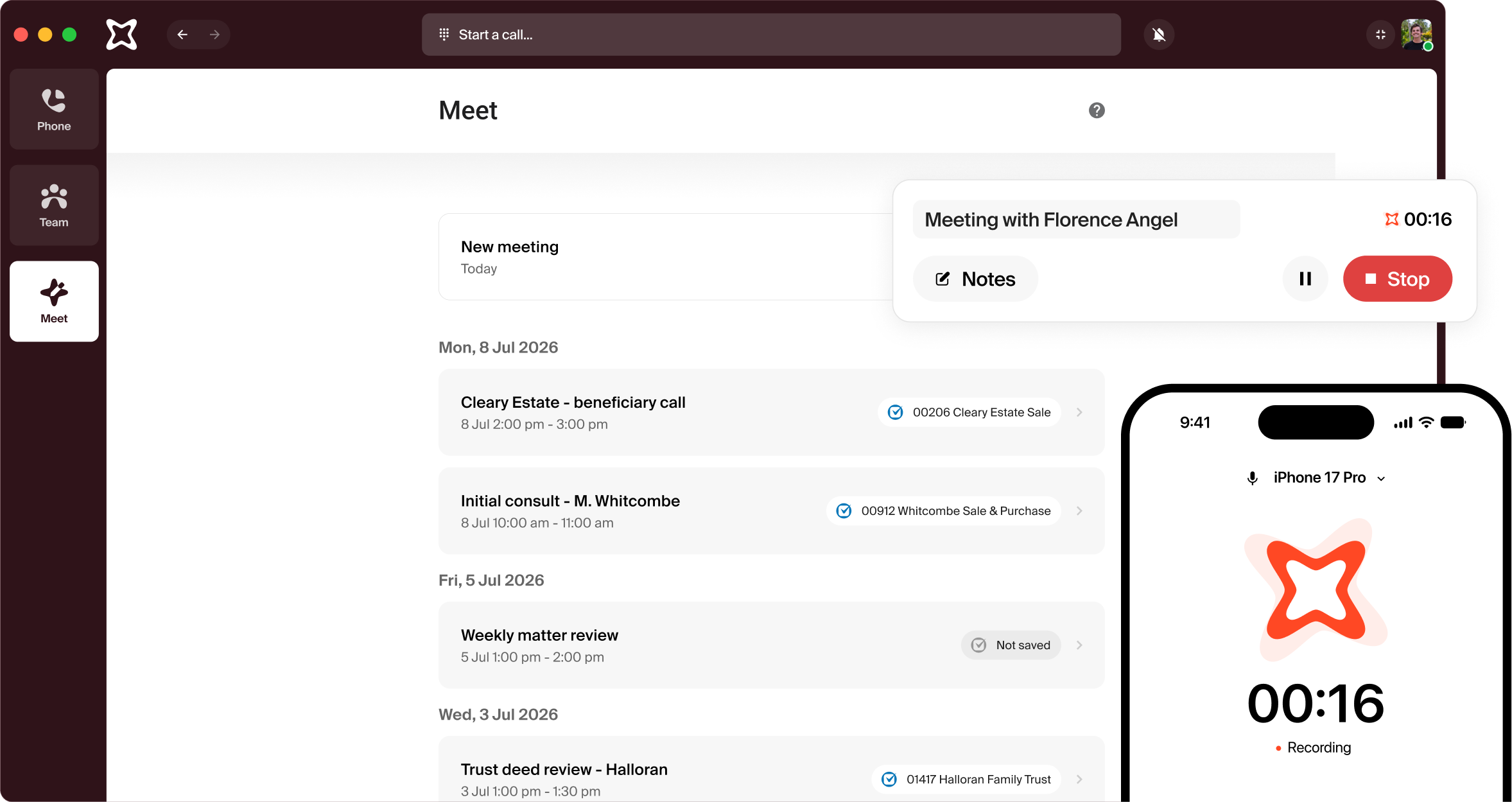
A bot-free notetaker is the more hands-off of the two notetakers. Here’s how it works in practice, using VXT Meet as the example.
VXT Meet is the AI notetaker built specifically for law firms. It captures audio straight from your computer’s microphone and system audio. For video calls, it doesn’t host the meeting and it doesn’t join as a participant or a bot, so nothing extra shows up on the call. It can capture in-person meetings too, using the microphone on whatever device you’ve got VXT running on.
Once it’s set up, it watches for meetings rather than waiting on you. When you start a video call, Meet spots it and prompts you with a “meeting detected” notification. From there you click the notification to start recording, or open the VXT Meet page and hit New. For an in-person meeting there’s no call to detect, so you start it yourself. Again, open Meet and select New.
Run the meeting as you normally would and when you’re done, you’ll have a transcript, a structured summary, and a clean set of notes.
Then comes the part that is genuinely useful for law firms, and the part most notetakers skip: those notes don’t just sit in another app. VXT Meet integrates with 25+ legal software platforms, including Clio, LEAP, Actionstep, Smokeball, MyCase, Filevine, Lawmatics, OneLaw, Lawcus, NetDocuments, and iManage. That means Meet can save your notes straight to the right matter in your legal software, and time spent in the meeting can be logged as a time entry right away. None of that data is used to train AI models, and you can export all of it at any time.
Give the summary a quick read before you rely on it – it’s a strong draft, not gospel – and the file note’s already on the matter, with the action items ready to copy over and send to the client.
Whichever notetaker you choose, it’s best practice to tell everyone at the start that the meeting’s being recorded and transcribed, and give them the chance to opt out. A quick heads-up avoids issues later and builds trust with the client (more on disclosure here).
Real-world example: What an AI notetaker can do for your firm
A transcript and summary is only worth having if someone actually uses it. For a fixed-fee firm like Nest Legal, where efficiency feeds straight into profitability, that’s the whole point.
Nest Legal pairs VXT alongside an AI assistant (Archie in Smokeball) to reduce admin and improve how information flows through the firm. As Nest Legal Founder, Laura Vickers, explains:
“If I’m jumping into a case someone else handled, I don’t have to read an entire transcript. I just right-click and get a quick summary of the client’s history, correspondence, and next steps.”
With the record already saved to the matter, anyone picking up the work can find what they need without digging. Handovers are faster, less slips between people, and the time that used to go on catch-up goes back into client work.
Conclusion
AI notetakers don’t replace staff. They take the friction out of capturing what’s already happening. Instead of leaning on memory, scattered notes, or a write-up at the end of a long day, you get a consistent record of every meeting without adding to your admin.
What that really changes is how a meeting feels. You’re not splitting your attention trying to get everything down. You can listen, ask better questions, and advise clearly, knowing the record takes care of itself.
A good AI notetaker saves you trying to listen, talk and type all at once. A great one saves you the work that comes after the meeting too.
If your firm runs on legal software and you spend a lot of your day in client meetings (virtual, in-person, or both) you want notes that file themselves and time-tracking that takes a single click.
That’s what VXT Meet is built to do, and it’s the same workflow more than 1,800 firms already trust for their phone calls. You can download VXT and give VXT Meet a try for free today.